September 24, 2012

Responsive Design and Portability into Windows 8

One of the most common gotchas when you're trying to deploy your Windows 8 Metro* HTML app to the Windows Store, is that the application does not support SnapView. In case you're not familiar with SnapView, it is the mode where your app is "snapped" to a side window while another app is in use in the main FillView window.


There are easy ways to implement this in Windows 8, but one striking things about the width of our SnapView window is the fact that it is 320 pixels wide, which happens to be the standard screen width of many mobile devices in portrait mode.

So if we have an existing web application that is "mobile-friendly" - meaning we've used Responsive Design and CSS Media Queries to ensure it will adapt to whatever environment it is being viewed in - this HTML code is not only portable into Windows 8, it also satisfies the SnapView requirement.

That’s one of the great stories about Windows 8 HTML apps that isn’t really being played up as much as it should – the fact that portability of traditional web applications INTO a Windows 8 HTML project is fairly seamless. As a web developer, one of the things that first impressed me about Windows 8 was the ease of running a traditional HTML application within a default new Metro* HTML project. Even an app that uses jQuery or other JavaScript frameworks.

After merely adding a traditional app’s .html, .css, and .js files to a new, empty Visual Studio 2012 HTML application, the only thing that prevented it from running as a full-screen Windows 8 app was the fact that the references to the WinJS javascript files needed to be added. Once these 3 JavaScript includes were added to the page, the application was instantly running full-screen, like any other Metro* application. Here are the required .js files

<!-- WinJS references -->
<script src="//Microsoft.WinJS.1.0/js/base.js">
</script>
<script src="//Microsoft.WinJS.1.0/js/ui.js">
</script>
<script src="/js/default.js"></script>
<link href="//Microsoft.WinJS.1.0/css/ui-dark.css" 
rel="stylesheet" />

Of course, referencing these WinJS-specific files excludes the reuse of this HTML code outside of the Windows 8 environment. But the “portability in” story is still nice – I say this as a web developer who originally came across Windows 8 as part of an experiment in HTML portability.
*I'll still be using the word Metro until there's an official term for applications that target the WinRT

Share |

August 24, 2012

Deploying HTML5 Metro apps to the Windows Store
...some common gotchas

After going through all the effort to build a Windows 8 Metro app before the OS is released, you'd think the hard part is behind you when development is done - what with the in-progress documentation, empty Google searches, and constantly mutating API. Now it's time to deploy to the Windows Store. How hard could that be?  Based on my own experiences, and insights from other early-bird developers, here's a look at some of the common offenses that will surely take you down the path of rejection:

1). Read the Certification Requirements. Really.
2). No items in the left and right swipe margins. No exceptions.
3). Buttons, in app functionality, credits, go down in the app bar or under Settings, not on screen.
4). Snapview - your app has to be usable when "snapped" to the 320 pixel sidebar section in Windows 8.

There are standard ways to handle the switch to Snapview in Windows 8, but for Metro HTML5/JavaScript apps you also should consider using Responsive Design,  Which I'll talk about next week.

Share |

March 06, 2012

PhoneGap HTML5 Portability II - Chrome Web Store Hosted Apps

Last week I talked about the Chrome Web Store being another good high-traffic outlet for your PhoneGap HTML5 codebase.

One of the first issues I encountered with my Packaged App in this new outlet was with advertising.  The ads displayed just fine, as they do on the main website, except for one thing - for every click, the earnings were always $0.00.  That's not good.  After an exhaustive search, I came across this promising answer, but still, $0.00 every time.

The actual problem was that I was using a Packaged App, which essentially is your entire codebase running locally on the user's machine. It ends up that ads within a Packaged App don't have a "legitimate" source URL, according to AdSense, since it's really just local code on the user's machine.  The Chrome Web Store's alternative to a Packaged app is a Hosted App - which is a link to the URL of your application. 

The Hosted App solution is not only appealing as a valid source to display ads, but from a maintainability standpoint I now have one less place to deploy to.  All I need now for deployment is my manifest file and app icons - the Web Store app just piggybacks on my already-existing website.

Here's a sample manifest file for a hosted app:
{
  "name": "My Cool App",
  "description": "This is a test of the Chrome Web Store",
  "version": "1.0.0.1",
  "app": {
    "urls": [      
      "*://www.yourwebsite.com /mail/",
      "*://www.yourwebsite.com /otherarea/"
    ],
      "launch": {
      "web_url": "http://www.yourwebsite.com/"
    }
  },
  "icons": {
    "128": "icon_128.png"
  },
  "permissions": [
    "unlimitedStorage",
    "notifications"
  ]
}
Note that you need to specify a launch URL, as well as any other non-asset URLs you'll be using.  And you will need to verify that you are the owner of this site using Google's Webmaster Tools.

So the quest for a solution to the AdSense problem sent me down the path of investigating Chrome Web Store "Hosted Apps", which not only resolved my advertising issue, but ended up being a better solution in general for my needs.

 If you're debating which type of app would work best for you, here is a good comparison of Hosted vs Packaged apps

Share |

February 27, 2012

HTML5 Portability beyond PhoneGap - The Chrome Web Store

One of the great benefits of doing mobile development using PhoneGap is the portability of the codebase. The same HTML application is easily wrapped and built for all major devices using PhoneGap and/or PhoneGap Build. And since your app is written using HTML, CSS and Javascript, you can make it accessible as a web app as well.

After I had already published a few apps to the Android Market using this technique, I read about the Chrome Web Store. And once I digested their publishing and deployment specs, I noticed that the same PhoneGap codebase could easily be deployed to this outlet as well. I re-deployed the same apps to the Chrome Web Store a few months ago, and my experience was so positive, I wanted to share a quick overview of how to deploy to this store, and some things you'll want to think about:

The deployment is simple for Chrome Web Store Packaged Apps - basically you create a .zip file of your HTML app, along with a simple .manifest file, the app icons, and preview images. Here's a sample manifest that launches splash.html at the root of your app:

{
  "name": "My Cool App",
  "description": "This is a test of the Chrome Web Store",
  "version": "1",
  "app": {
    "launch": {
      "local_path": "splash.html"
    }
  },
  "icons": {
    "16": "icon_16.png",
    "128": "icon_128.png"
  }
}

(Full documentation)

The preview images are not required, but you'll never get very high in the rankings without them... and of course the image sizes don't match the Android Market sizings, so you'll need to create new ones. And they will not accept them until the images meet their aesthetic criteria - I had two go-arounds with them because of font sizing.

...but the pleasant surprise was the traffic:

The identical app in the Android Market after 6 months or so has about 2400 downloads, and is approaching 1000 active installs.

In the Chrome Web Store, there are 3500+ users in less than two months, and 250+ users daily, 14,000+ total. Rarely is there inactivity when using Google Analytics' real-time tools.

The manifest sample I showed was for a Chrome Web Store "Packaged App", but for my needs I found that a "Hosted App" was the better way to go - and even easier. My post next week will highlight the advantages of using a Hosted App, plus some tips on using advertising.

Share |

November 22, 2011

Achieving Broad Reach with Responsive Design + PhoneGap

The committee for The M3 Mobile Conference was kind enough to allow me to speak about creating cross-platform mobile applications using PhoneGap last week, so I thought I'd share some points from the talk here.

When you need to create an application with a specific look and feel across multiple platforms and devices, PhoneGap can be the perfect tool. But before you just wrap your application up and ship it, you'll want to use Responsive Design techniques to ensure all users get an appropriate experience regardless of their device. For instance, you don't want the 320 x 480 version of your app appearing scrunched to that size in the middle of an iPad, or even worse, in the upper left corner. Conversely, you don't want your beautiful iPad app scrolling horizontally and vertically on every smaller device. So you'll want to use Responsive Design to tailor your HTML5 application to as many devices as possible, and then use PhoneGap to progressively enhance the experience when viewed natively on mobile devices as well.

Flexible grids and media queries are important part of implementing Responsive Design in your website/application. Once the application is looking and functioning the way we want it on our desired device(s), we can use PhoneGap to access additional functionality if we are being viewed on a mobile device, and PhoneGap Build to automatically generate the native binaries for many smartphone devices using our single HTML5 codebase.

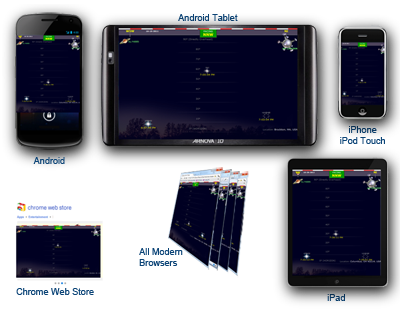
We're going to target Android and iPhone devices, including tablets, as well as most current web browsers, and the Chrome Web Store for our HTML application.
Our sample app (links to all versions below) is going to call the Google Geocode API as well as the Heavens Above API to display viewing information for the next pass of the International Space Station based on the desired position. For progressive enhancement, our app will allow mobile device users to merely use their device coordinates, and allow HTML5-enabled users to have access to their history of locations using HTML5 LocalStorage.

PhoneGap Build then compiles the latest version of the application checked into the Git repository, but most intrepid web developers can access all the necessary source code using any web browser.

The Sample Application:
(All versions compiled using identical codebase)

Issues, feedback, suggestions most welcome - especially on the Sybian and WebOS versions.

Share |